If you are reading this, there is a good chance you are still using paper test sheets to record your pool water quality readings. Red folders, laminated sheets, columns for pH, free chlorine, combined chlorine, temperature, and a biro that has run out again.
You are not alone. The vast majority of commercial pool operators in the UK are still on paper. It works, it is cheap, and everyone knows how to fill in a form. So why would you change?
I managed pool compliance on paper for years. I understood the system, I kept on top of it, and it did the job. But I also spent a lot of time doing things that did not need to be that difficult. And when I finally moved to digital, I realised how many problems I had been quietly working around without even noticing them.
This is not a sales pitch disguised as a blog post. Paper genuinely works for a lot of operators, and there is nothing wrong with it. But if you have ever had any of the problems below, it is worth thinking about whether digital would make your life easier.
The problems with paper that nobody talks about
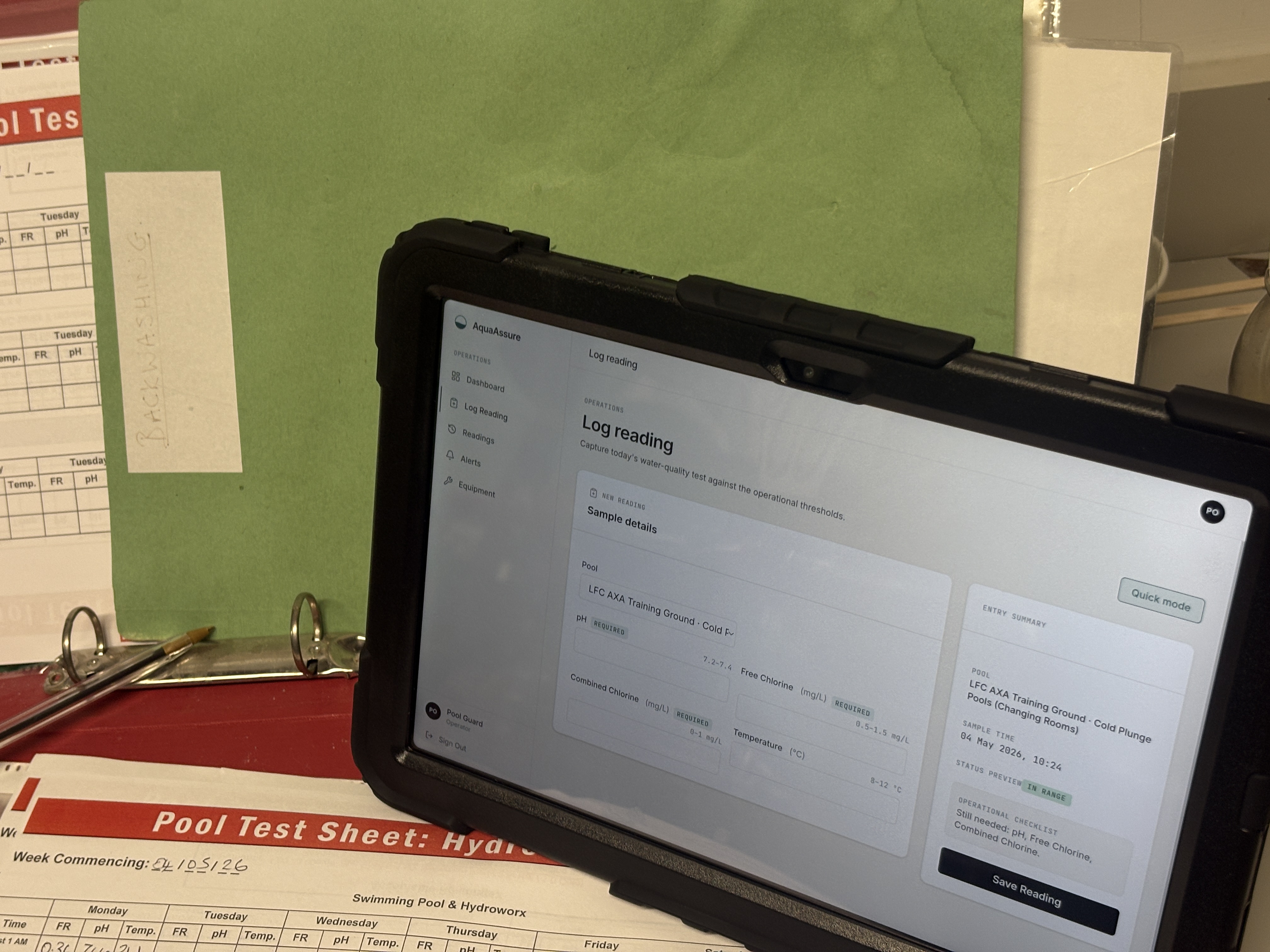
You cannot read the handwriting
This is the most common one and the most embarrassing. You have got a folder full of test results, but half of them are illegible. Was that a 7.2 or a 7.8? Is that a 1.5 or a 1.0? When it is your own handwriting from last week, you can probably figure it out. When it is someone else's writing from three months ago, good luck.
This is not just an annoyance. If an EHO asks to see your records and cannot read them, they are going to start asking questions. Illegible records are functionally the same as no records.
Sheets go missing
Paper gets lost. It gets coffee spilled on it. It gets left in the wrong folder. Someone takes it out to photocopy it and it never comes back. Over the course of a year, you will almost certainly have gaps in your paper records. And gaps are exactly what inspectors look for, because a gap could mean the testing was not done.
Nobody spots trends
When your readings are written on a sheet, they are just numbers in columns. You can see if today's pH is in range, but can you tell at a glance whether your pH has been slowly drifting upward over the last three weeks? Can you see that your combined chlorine tends to spike every Thursday afternoon? Probably not, because that kind of pattern recognition requires looking at data over time, and paper does not make that easy.
By the time you notice a trend on paper, it has usually already become a problem.
Out-of-range readings get buried
With paper, an out-of-range reading gets written down, someone deals with it (hopefully), and life moves on. But there is no automatic flag, no alert, and no system to make sure the corrective action was recorded and a retest was done. It relies entirely on the person taking the reading knowing what to do and following through.
In a busy facility with multiple pools and multiple staff, things slip through. Not because people do not care, but because there is no safety net.
Audit preparation is painful
If you have ever had to prepare for an inspection or put together compliance reports for management, you know the drill. Pull out the folders, go through the sheets week by week, manually count the out-of-range results, check whether corrective actions were documented, and try to assemble it all into something presentable. It takes hours. Sometimes days.
And even after all that work, you are never completely confident that you have not missed something.
What digital pool log software actually does
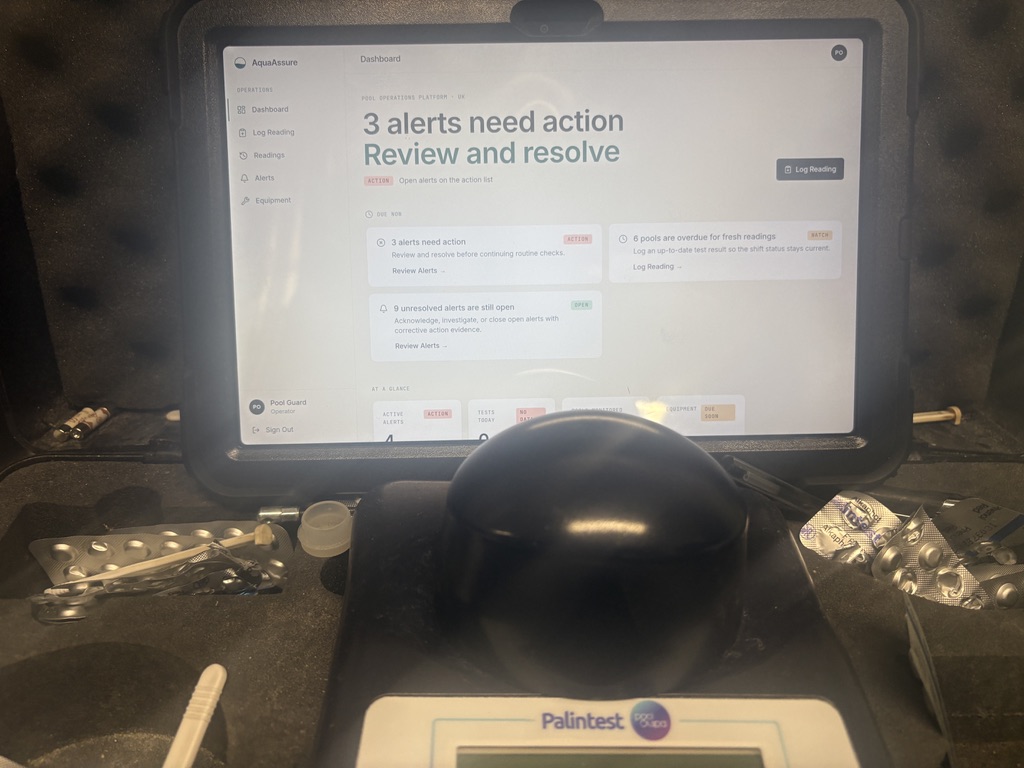
At its core, digital pool log software replaces the paper sheet with a screen. You enter the same readings (pH, free chlorine, combined chlorine, temperature) but into an app or web platform instead of onto paper.
But the real value is in what happens after you enter the data.
Automatic range checking: The system knows what the acceptable ranges are for each parameter and each pool. If you enter a reading that is out of spec, it tells you immediately. No ambiguity, no relying on memory.
Alerts and notifications: If a reading needs action, the system flags it. If testing is overdue, you get reminded. If a corrective action has not been recorded, it stays on your task list until it is dealt with.
Trend visibility: Digital systems can show you your data over time. You can see patterns forming before they become problems. A pH that is gradually creeping up over a fortnight is easy to spot on a graph. On paper, you would need to sit down and manually compare readings across multiple sheets.
Instant audit trail: Every reading is timestamped, attributed to a named operator, and stored permanently. Corrective actions are linked to the original out-of-range reading. When an inspector asks to see your records, you can pull up everything in seconds.
Compliance reporting: Instead of manually compiling reports, you can generate them automatically. How many tests were done last month? What was the compliance rate? Which pools had the most out-of-range readings? These questions take hours to answer with paper and seconds to answer with software.
What to look for in pool log software
Not all pool management software is the same. Some platforms are essentially digital versions of the paper sheet and do not add much beyond that. Others try to do everything but are so complicated that nobody uses them properly. Here is what actually matters:
Built for UK compliance: Make sure the software is designed around PWTAG and HSG179 requirements, not American or Australian standards. The parameter ranges, testing frequencies, and compliance expectations are different, and a system that does not understand UK requirements will create more problems than it solves.
Mobile-first design: Your operators are testing poolside, not sitting at a desk. The software needs to work properly on a phone or tablet, ideally with a simple interface that can be used with wet hands and in poor light.
Automatic range checking: This is the single most important feature. If the system does not know whether a reading is in or out of range, it is just a digital notepad.
Corrective action tracking: When a reading is out of spec, the system should prompt the operator to record what they did about it. This is what creates the compliance trail that inspectors want to see.
Multiple pools and users: If you manage more than one pool (and most commercial facilities do), the system needs to handle that cleanly. Different pools may have different parameter ranges (a cold plunge pool has different temperature expectations to a hydrotherapy pool), and the software should accommodate that.
Data export and reporting: You need to be able to get your data out of the system, either as PDF reports for management or as raw data for your own analysis. Avoid anything that locks your data in.
Reliability: The system needs to work every time. If it is slow, crashes regularly, or loses data, your operators will go back to paper within a week.
How to make the switch
Moving from paper to digital does not need to be a big bang event. Here is a practical approach that works.
Start with one pool
Pick your highest-priority pool (probably the one that gets the most use or the most scrutiny) and start logging digitally for that one. Keep your paper sheets running in parallel for the first few weeks so you have a backup and can compare.
Get your operators involved early
The people who take the readings every day are the ones who will make or break this. Show them the system, let them try it, and listen to their feedback. If they find it harder than paper, figure out why and fix it. If they find it easier, they will sell it to the rest of the team for you.
Set your parameter ranges before you start
Before you log your first reading, make sure the acceptable ranges for each parameter and each pool are configured correctly in the system. Getting this wrong will either generate false alerts (which people learn to ignore) or miss genuine problems (which defeats the purpose).
Do not try to backfill historical data
It is tempting to try to enter all your old paper records into the new system, but it is almost never worth the effort. Start fresh, keep your old paper records filed for reference, and build your digital history from day one.
Give it a month before you judge it
Any new system feels slower at first because you are learning it. Give your team a month of consistent use before you decide whether it is working. Most of the complaints you hear in week one will have disappeared by week four.
The cost question
Paper is essentially free. A pack of test sheets and a folder costs almost nothing. Digital pool log software costs money, usually a monthly subscription.
The question is not whether digital is more expensive than paper (it is), but whether the time it saves and the problems it prevents are worth the cost. If you spend two hours a month compiling compliance reports, that is time you could be spending on something else. If you avoid one failed inspection because your records were complete and accessible, the software has paid for itself many times over.
Most pool log software offers a free tier or a trial period. Use it. There is no risk in trying, and you will know within a couple of weeks whether it adds value for your facility.
How AquaAssure fits in
AquaAssure is the platform we built to solve exactly these problems. It started in a real plant room at a real facility, because we were tired of managing compliance on paper and could not find software that was designed for UK commercial pool operators.
It handles water quality logging with automatic range checking, corrective action tracking, equipment maintenance scheduling, and compliance reporting. It is mobile-first, PWTAG and HSG179 aligned, and designed to be simple enough that any operator can use it without training.
If you are thinking about making the switch from paper, book a demo and we will show you how it works. No pressure, no hard sell, just a look at what it does and whether it would help your facility.